Terraform Lifecycle Rules 101:
𝑪𝒍𝒐𝒖𝒅 𝒂𝒏𝒅 𝑫𝒆𝒗𝑶𝒑𝒔 𝑻𝒆𝒄𝒉 𝑪𝒐𝒎𝒎𝒖𝒏𝒊𝒕𝒚 || 𝑷𝒓𝒐𝑫𝒆𝒗𝑶𝒑𝒔𝑮𝒖𝒚 🤖 https://t.me/prodevopsguy 👋 Hi there! We are ProDevOpsGuy, a passionate DevOps enthusiast Tech Community with a strong belief in the power of automation and collaboration to drive innovation. 🚀 I thrive in bridging the gap between development and operations, creating seamless and efficient software delivery pipelines. My journey in the world of DevOps has allowed me to blend my technical skills with a knack for problem-solving, enabling me to contribute effectively to agile and dynamic environments. 💡 With a keen interest in continuous integration, continuous delivery (CI/CD), containerization, and orchestration, I've had the privilege to explore cutting-edge technologies like Docker, Kubernetes, Jenkins, and Ansible. I find joy in designing scalable and resilient infrastructures that enable teams to deploy applications faster and with greater confidence. 🌐 Beyond the tech realm, I'm an advocate for DevOps culture, emphasizing collaboration, communication, and a relentless pursuit of improvement. I'm always eager to connect with fellow professionals, exchange insights, and explore opportunities to collaborate on exciting projects. 📚 When I'm not tinkering with the latest DevOps tools, you can find me indulging in books on technology trends, hiking to rejuvenate, and occasionally experimenting with new coding challenges. 🌟 Let's connect! Whether you're looking to discuss DevOps methodologies, explore partnership opportunities, or simply share experiences, feel free to reach out. I'm excited to be part of the DevOps journey, driving excellence together.
What is Terraform?
Terraform is a free and open-source infrastructure as code (IAC) that can help automate the deployment, configuration, and management of remote servers. Terraform can manage both existing service providers and custom in-house solutions.
Read more about Terraform here.
Terraform Resource Behaviour:
Once an object is created, it is saved in the Terraform state. Terraform can then update the object if its settings are changed in the configuration or destroy it if the resource is removed from the configuration.
Depending on the settings defined in the configuration, Terraform will take one of the following actions when applying the configuration:
Create — Creates the object with the defined settings.
Destroy — Destroys the object when the configuration no longer exists.
Update-in-place — Updates the object accordingly when the settings in the
resourceblock are changed.Destroy and recreate — Destroys the object before re-creating it, if certain settings change within the
resourceconfiguration block means this must happen on the given platform.
Terraform behavior Usually when we do any modifications on terraform resources where it’s already available; For example, consider resources like the EC2 instance that we created on the cloud already running. If we make some modifications for the smaller changes, they will replace the arguments.
- Create VPC in
us-east-1
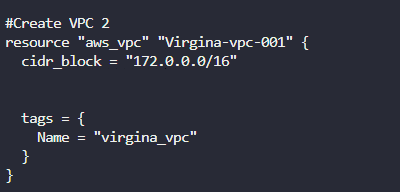
- When we do
terraform planwill show a plan to create a new VPC.

Run
terraform applyto create a new VPC.Now, If I add the tag as
environment = dev, this will just change the current VPC, As shown below.
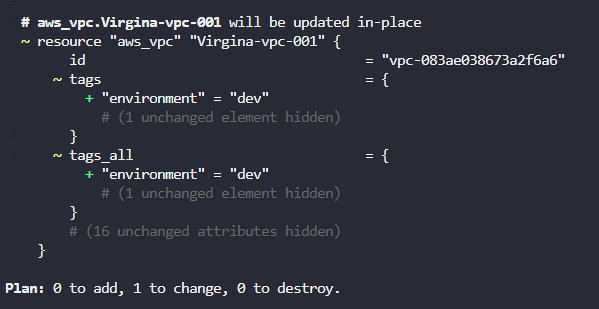
- When we make any big changes to the existing resource like changing the availability zone or instance type of EC2 instance, it will destroy the old resource and replace the new one, As shown below.

- This is the terraform default behaviour. For simple changes, it will just replace the arguments, For bigger changes, it destroys old resources and recreates them. This is not advisable to destroy after creation. After the destruction, we may face an issue with a new resource.
To avoid this, we have three lifecycle rules.
Create before destroy.
Prevent destroy
Ignore changes
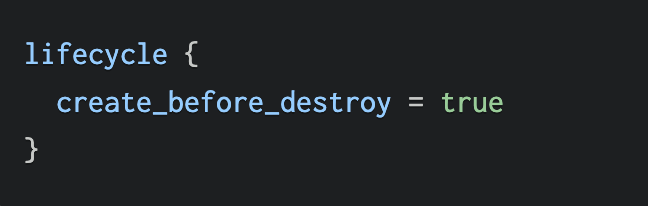
Create before destroy:
- When Terraform determines it needs to destroy an object and recreate it, the normal behaviour will create the new object after the existing one is destroyed. Using this attribute will create the new object first and then destroy the old one. This can help reduce downtime. Some objects have restrictions that the use of this setting may cause issues with, preventing objects from existing concurrently. Hence, it is important to understand any resource constraints before using this option.
Prevent destroy:
- This lifecycle option prevents Terraform from accidentally removing critical resources. This is useful to avoid downtime when a change would result in the destruction and recreation of
resource. This block should be used only when necessary as it will make certain configuration changes impossible.
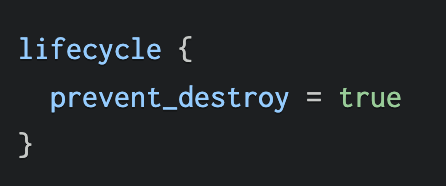
Terraform will error when it attempts to destroy a resource when this is set to true.

Ignore changes:
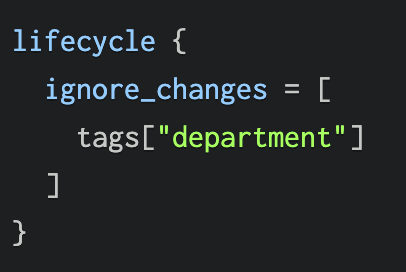
- This lifecycle option can be useful when attributes of a resource are updated outside of Terraform, for example, when an Azure Policy automatically applies tags. When Terraform detects the changes the Azure Policy has applied, it will ignore them and not attempt to modify the tag. Attributes of the resource that need to be ignored can be specified. In the example below, the department tag will be ignored:
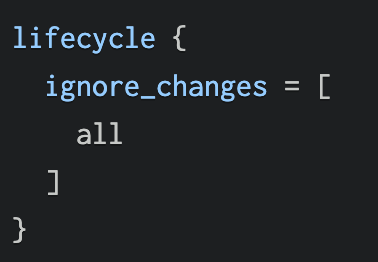
- If all attributes are to be ignored, then
allkeywords can be used. This means that Terraform will never update the object but will be able to create or destroy it.
If you find this article helpful then you can buy me a coffee
Follow for more stories like this 😊.